
Premium
Smile works as a launcher without paying, and it always will. Premium is for people who want live widgets too, and for people who just want to keep the app going.
What stays free
All ten widgets. The launcher and the clock. Every launch mode, including seamless launching. Every daily limit, every breather, the confirmation prompt and the usage statistics. Every appearance setting, including custom fonts, themes, master appearance and transparent backgrounds. Import and export. All 47 languages.
None of that is a trial and none of it expires.
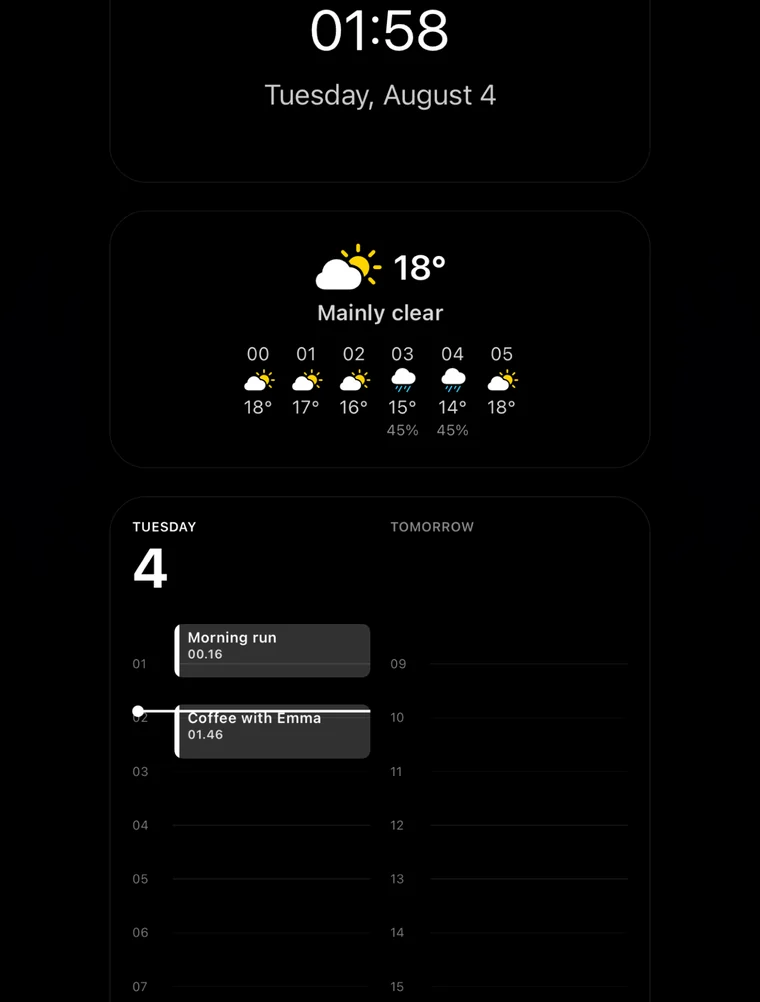
What the live widgets look like
A clock, the weather with an hourly forecast, and your day laid out as a timeline. They use the same fonts, colours and alignment controls as the launcher, so they can be made to match the rest of your home screen or deliberately not to.
Free widget types
- Shortcuts
- The launcher itself. Your apps as a list of words.
- Clock
- Time and date, with formats, alignment and sizes you set yourself.
Premium widget types
- Weather
- Current conditions for your area, from Apple Weather.
- Clock + Weather
- Both at once, with the weather above or below the clock.
- Weather Forecast
- The next few hours or the next few days.
- Agenda
- What is coming up next in your calendar.
- Calendar
- A real month grid, with event days marked.
- Countdown
- Days left until a date you set.
- Time Progress
- How far through the day, week, month or year you are, as a bar or dots.
- Moon Phase
- Tonight’s phase, with illumination, and a southern hemisphere option.
Premium also turns off the recommendations
Now and then, while you are browsing inside the app, Smile shows one card recommending a product we actually like, usually something that pairs with a quieter phone. It never appears while you are launching something. Premium hides them for good.
What it costs
Three options, bought through the App Store. Prices are shown in your own currency before you buy, and Apple handles the billing, the receipts and any refund.
- Lifetime
- One payment, keeps working
- Monthly
- Auto-renewing subscription
- Weekly
- Auto-renewing subscription
Subscriptions renew until you turn off auto-renew in your Apple Account settings, at least 24 hours before the period ends. Lifetime is a one-time purchase that covers every device signed in with your Apple Account. You can restore an earlier purchase from inside the app.
Full detail is in the terms of use.